TYPO3 and Intune: How to achieve a secure Microsoft architecture
TYPO3 and Intune: Architecture
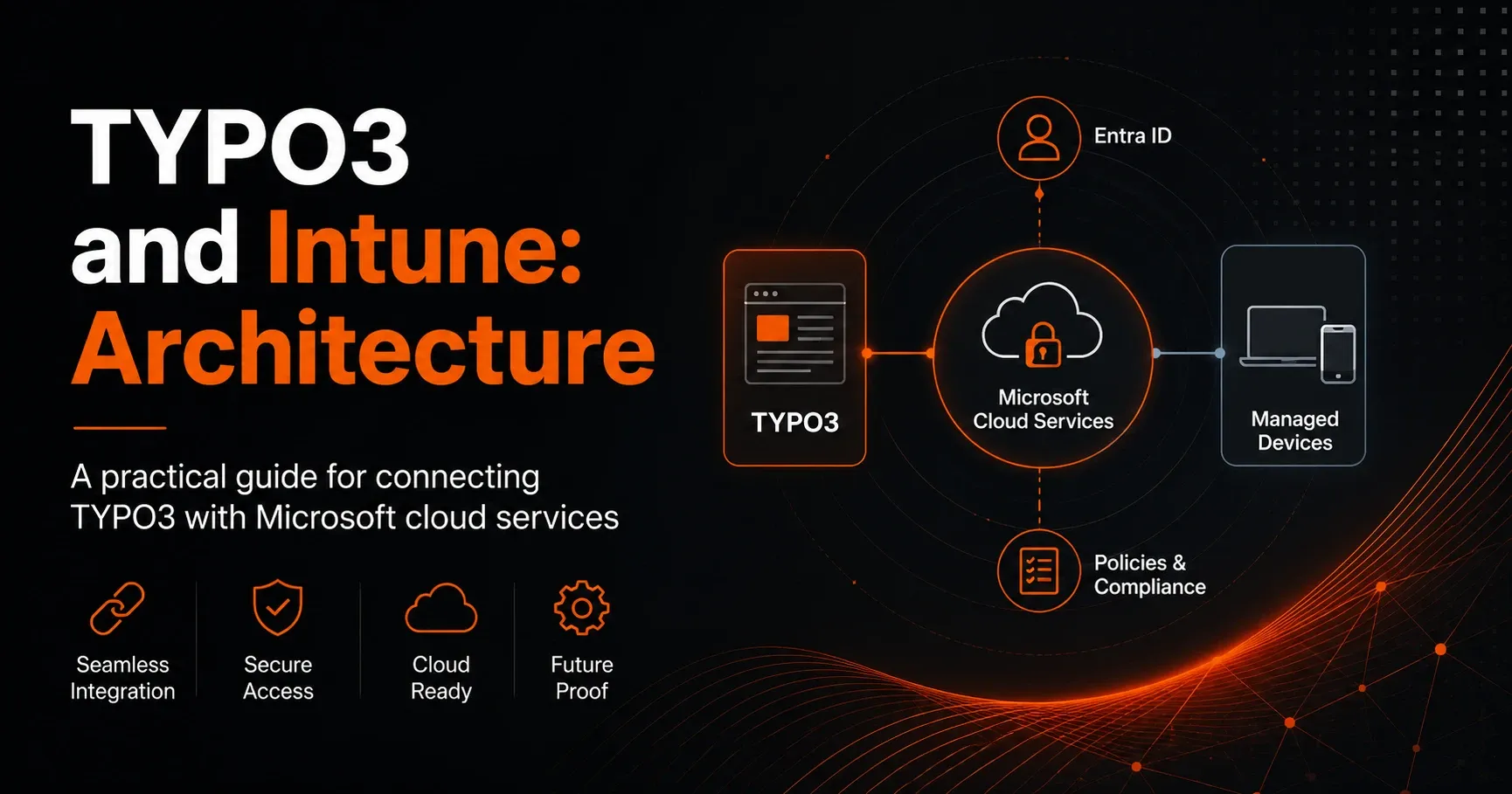
The combination of TYPO3 with Microsoft Intune and other Microsoft cloud services is especially interesting for companies when web platforms, device management, and identity management are to be combined in a central, secure architecture. This guide shows in practical terms how a robust TYPO3-Microsoft architecture can be built, which components interact, and what you should pay attention to in terms of security, scalability, and maintainability.
Why combine TYPO3 with Microsoft cloud services?
TYPO3 is known as a powerful enterprise CMS and is ideally suited for complex websites, intranets, portals, and multilingual content. Microsoft Intune, on the other hand, is part of the Microsoft ecosystem for Endpoint Management and supports companies in managing devices, policies, and access. Combined with Microsoft Entra ID, Azure services, and other cloud components, a modern digital platform can be created that meets central security and governance requirements.
The combination is particularly useful if your organization:
– needs secure login with Single Sign-on
– delivers internal content via a protected portal
– wants to centrally control device and access policies
– is planning a scalable and low-maintenance hosting architecture
– wants to integrate TYPO3 into an existing Microsoft cloud landscape
What does architecture mean in this context?
In the architecture for TYPO3 and Intune, it is not just about hosting TYPO3, but about the interaction of all relevant layers: infrastructure, identity, access, endpoint security, data storage, and monitoring. Intune itself does not run directly “in” TYPO3, but controls the endpoints and security policies through which users access TYPO3-based applications. The actual integration therefore takes place via Microsoft cloud infrastructure and authentication and security mechanisms.
Architectural building blocks of a TYPO3-Microsoft solution
1. TYPO3 application layer
TYPO3 forms the central web application. Depending on requirements, the system can be operated as a classic CMS, an intranet portal, or a headless CMS. It is important to clearly separate frontend, backend, database, and file storage so that maintenance and scaling remain efficient.
2. Identity layer with Microsoft Entra ID
For authentication and access management, Microsoft Entra ID is typically used in Microsoft environments. Users log in with their corporate account while permissions are managed centrally. For TYPO3, this can be implemented via SSO, SAML, or OpenID Connect, depending on the technical target architecture.
3. Intune as the endpoint management layer
Microsoft Intune manages endpoints such as laptops, tablets, and smartphones.[1] In a TYPO3 environment, Intune ensures that only managed, compliant devices can access sensitive content or backend areas. This allows access requirements such as device protection, encryption, or compliance status to be defined.
4. Hosting in the cloud or a hybrid environment
TYPO3 can be operated in Azure or in a hybrid architecture. In many projects, Azure is a good choice because scaling, network security, backup, and monitoring can be efficiently implemented there with Microsoft-native services. Alternatively, a hybrid model is also possible if parts of the infrastructure must remain on-premises.
5. Database and file storage
TYPO3 requires structured content, media, and configuration data. The database should be operated with high availability, while media should ideally be stored in secure and scalable object storage. In Microsoft architectures, Azure SQL Database, Azure Database for MySQL, or Azure Storage are often used for this, depending on technical requirements.
Recommended target architecture for TYPO3 with Microsoft Intune
A practical target architecture consists of several layers. At the center is TYPO3 as the web application. In front of it is a secure access layer with reverse proxy, web application firewall, and optional CDN. Identity verification takes place via Microsoft Entra ID. Intune ensures that endpoints meet the security requirements. The infrastructure runs in Azure or a hybrid Microsoft environment. Monitoring, logging, and backup ensure transparency and recoverability.
A typical setup could look like this:
– Users access TYPO3 via managed devices
– Intune checks compliance and device status
– Microsoft Entra ID authenticates the user
– TYPO3 provides content or backend functions
– Azure services handle hosting, security, and scaling
– Monitoring and logging secure operations
Security aspects of the integration
The integration of TYPO3 into a Microsoft cloud architecture should always be designed with a Zero Trust approach. This means no access is trusted by default; every request is verified.[3] Identity, device state, network path, and permissions are especially important here.
Important security measures
– Use of multi-factor authentication
– Access to backend areas only for defined user groups
– Protection via HTTPS and modern TLS configurations
– Use of a web application firewall
– Separation of development, test, and production environments
– Regular updates of TYPO3, extensions, and server components
– Logging of security-relevant events
TYPO3 authentication with Microsoft Entra ID
One of the most important integrations is connecting TYPO3 to Microsoft Entra ID for Single Sign-on. This means users do not have to manage multiple sets of credentials. That improves not only convenience but also security. Especially in intranet or portal projects, SSO is a key building block for managing identities consistently.
The technical implementation can, for example, be done via SAML or OpenID Connect.[2] Which method is more suitable depends on the TYPO3 version, the extensions used, and the requirements for user attributes and role management.
What role does Intune play specifically?
Intune is particularly valuable in the overall architecture when corporate content may only be accessed from compliant devices. For example, you can define that only devices with enabled encryption, current patch levels, and defined protection policies are allowed to access the TYPO3 backend or internal content.
In practice, Intune supports, among other things:
– device compliance for Windows, macOS, iOS, and Android
– configuration policies for browsers, VPN, and security
– protection of corporate data on mobile devices
– conditional access in combination with Microsoft Entra ID
– control over which devices and apps can access resources
Typical use cases
Intranet and employee portal
A common scenario is an internal employee portal based on TYPO3. Employees log in with their corporate account via Entra ID. Intune ensures that only managed devices can access sensitive content. This increases security for HR portals, policy documents, or internal news.
Public website with protected backend
Public TYPO3 websites also benefit from the Microsoft architecture, especially on the administration side. Editors, developers, and administrators access the backend with secured identities, while the frontend remains publicly available. This can significantly reduce operational risks.
Headless frontend and cloud integration
When TYPO3 is used as a content backend for apps, portals, or digital signage, a clean cloud architecture becomes even more important. Content can be delivered via APIs, while authentication, device control, and access protection are managed through Microsoft services.
Best practices for a sustainable architecture
A good TYPO3-Microsoft architecture should not only work, but also remain maintainable and extensible in the long term. That is why clear standards and documented processes are essential.
Recommended best practices
– Containerization or standardized server images for reproducible deployments
– Automated delivery via CI/CD pipelines
– Separation of configuration, code, and content
– Use of managed services wherever sensible
– Role-based access control for TYPO3 and Microsoft services
– Regular security and performance audits
– Backup and recovery concepts with tested restore processes
Performance and scalability
Especially with growing traffic or international web projects, TYPO3 must remain performant. With an Azure-based architecture, you can better absorb traffic spikes, for example through horizontal scaling, caching layers, and static delivery of frequently accessed content. In combination with CDN, reverse proxy, and efficient caching, loading times can be significantly improved.
The following are also important for high-performance systems:
– optimized TYPO3 caching
– a lean selection of extensions
– image optimization and media management
– database tuning
– monitoring of response times and error rates
Operations, monitoring, and governance
Ongoing operations are a crucial part of any architecture. With Microsoft cloud services, you can centrally collect logs, metrics, and security events.[4] This makes it possible to identify anomalies early and resolve them more quickly. In a professional environment, responsibilities, change processes, and security policies should also be clearly defined.
In this context, governance also means that access rights are reviewed regularly, obsolete user accounts are removed, and extensions are approved in a controlled manner. Especially in complex TYPO3 installations, this prevents later problems.
Common mistakes in TYPO3-Microsoft projects
Projects integrating TYPO3 with Microsoft Intune and other cloud services often encounter similar mistakes. These include an unclear separation between authentication and device management, insufficient security concepts, or an overly complex architecture without documented operational processes.
Other typical issues are:
– lack of coordination between IT, security, and business departments
– incomplete SSO configuration
– too many manual deployments
– missing tests for update and restore scenarios
– unclear permission models in TYPO3 and Microsoft Entra ID
Conclusion: sensibly connect TYPO3 and Intune architecturally
The combination of TYPO3 and Intune is less a direct technical coupling and more a strategic architectural decision. TYPO3 provides the content and portal framework, Intune the control over endpoints, Microsoft Entra ID the identity, and Azure the scalable infrastructure. Together, they create a modern, secure, and well-governed platform for corporate communications, intranets, and digital services.
Anyone integrating TYPO3 into a Microsoft cloud architecture benefits from centralized identity management, clear security policies, and high scalability. The key is careful architectural planning so that authentication, device security, hosting, and operations work together seamlessly.
If you want to connect TYPO3 with Microsoft services, an architecture-driven approach from the very beginning is worthwhile. This creates a solution that not only works today, but also reliably supports future requirements for security, compliance, and growth.
Further reading
- TYPO3 and Managed Identities: Secure Architecture for Microsoft Integrations
- TYPO3 and Microsoft 365: Scalable Architecture for Strong Integrations
- TYPO3 and Azure: Secure Architecture for Modern Document Management
- TYPO3 and Azure Entra ID: Secure Architecture for Modern Editorial Workflows
Sources and references
- Microsoft Learn: What is Microsoft Intune? (accessed 2 October 2026)
- TYPO3 Documentation: Authentication Service (accessed 2 October 2026)
- Microsoft Learn: What is Zero Trust? (accessed 2 October 2026)
- Microsoft Learn: Azure Monitor overview (accessed 2 October 2026)